
Home (PrestaShop)
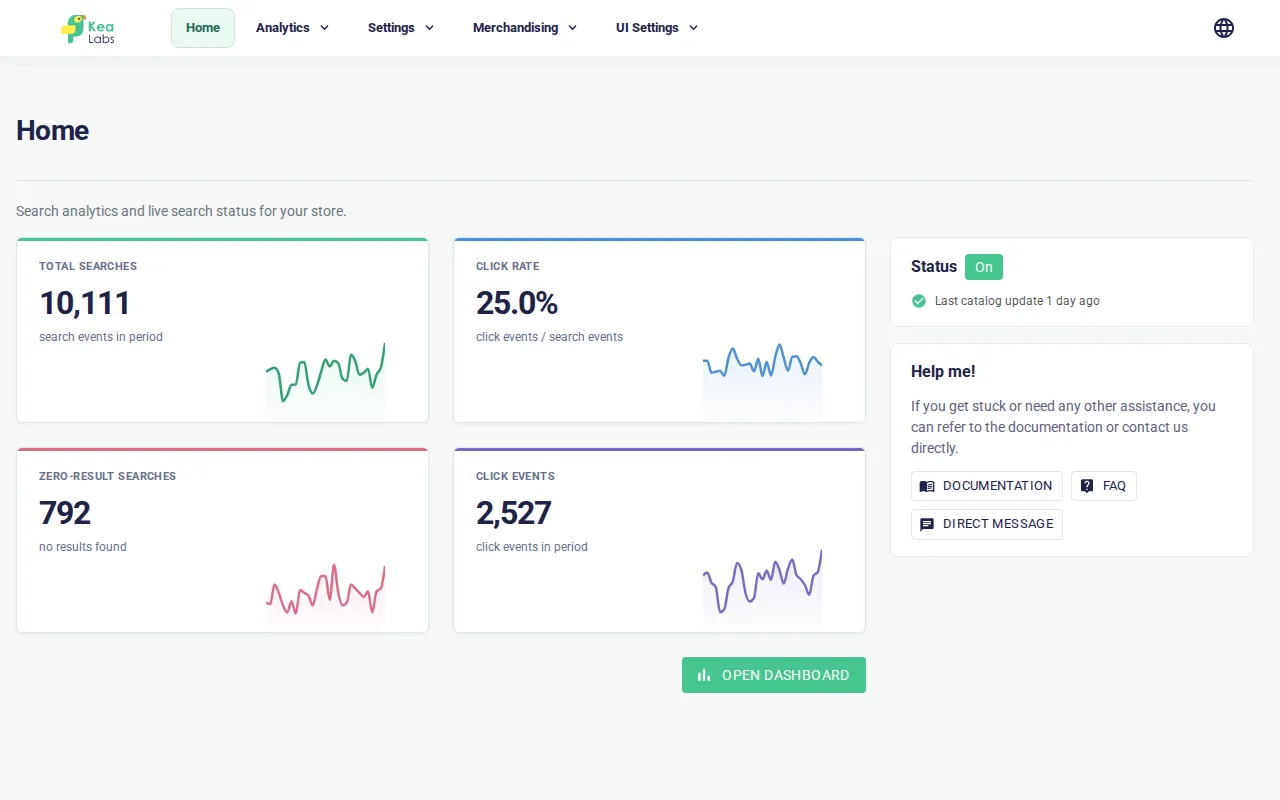
Home is the first page of the embedded Kea Labs dashboard. It gives you a quick view of search activity and the current storefront status without opening a detailed report or settings page.
Where to find it
Section titled “Where to find it”- In the PrestaShop back office, open Modules → Module Manager.
- Find Kea Labs Search Pro and click Configure.
- Click Home in the embedded Kea Labs navigation.
What the page shows
Section titled “What the page shows”The main area contains four search-activity cards for the current reporting period:
- Total Searches — search requests recorded in the period.
- Click Rate — the share of searches that produced a product click.
- Zero-Result Searches — searches that returned no products.
- Click Events — product clicks attributed to search.
Each card includes a compact trend line. Click Open Dashboard to open the full Analytics dashboard and inspect the report in more detail.
The right column contains:
- Status — whether Kea-powered search is currently on or off;
- Last catalog update — how recently the latest catalog update completed;
- Help me! — links to documentation, FAQ, and direct support.
What to do next
Section titled “What to do next”- Open Analytics when a metric needs investigation.
- Open Settings → Catalog history when the catalog-update time looks stale.
- Open Settings → Diagnostics when search health or preview behaviour needs investigation.
- Open UI Settings → Integration to change the search experience or live search state deliberately.
Home is a summary page. Use Settings for fields, facets, synonyms, catalog data, and diagnostics; use Merchandising and UI Settings for shopper-facing configuration.